Browser guide · Góc Làm Việc Editorial · Publisher information checked 24 October 2026
Flip Trickster landing tips are most useful when they explain the miss. A short landing, too much rotation and a poorly aligned body are different problems. This guide offers a controlled practice method for the parkour simulator already embedded on this site, without claiming a perfect-score formula.
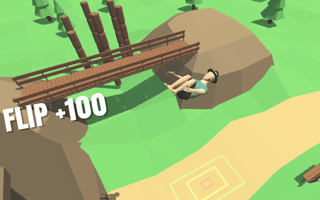
- Guide focus
- Separate launch power from rotation
- Genre
- Physics flipping challenge
- Game provider
- GamePix
- Play format
- Browser player, loaded on request
Flip Trickster – Parkour Simulator browser controls
The publisher lists touch or arrow-key input and a flip control. Read the current player’s opening prompt for the exact action binding: a mobile app’s hold-and-release gesture should not automatically be assumed to match this browser edition. Start with its simplest stage before adding extra inputs.
Judge rotation separately from distance
On a failed attempt, first ask whether the character reached the landing area at all. Only then ask whether the feet were aligned. Our suggested approach is to keep the same starting situation while changing one part of the flip. Trying a different launch and a different rotation together can hide which adjustment actually helped.
How to land on your feet: use a visual reference
Choose a visible moment in the arc, such as approaching the top of the jump, to judge orientation. Do not interpret this as a fixed release point: the right action depends on the stage and controls. The value of a reference is consistency. It gives you a way to compare two attempts instead of reacting to the final crash alone.
Under-rotation versus over-rotation
If the character reaches the target while still short of a feet-first position, test a little more rotation using the available control. If the body passes that position, test less. If the body looks aligned but misses the target, revisit travel distance rather than continuing to alter rotation. This diagnostic split is an editorial practice tool, not a promise about the game’s scoring calculation.
Avoid learning every stage as a new trick
When a new platform changes the height or gap, return to a simple controlled flip before chasing more spins. Keep one successful reference attempt in mind and identify what the new geometry changes. Additional flips are a poor trade if you cannot yet repeat the basic landing.
Play Flip Trickster – Parkour Simulator in your browser
This is the same provider URL already used in our game catalog. The partner player loads only after you press Play; its advertising and privacy terms apply.
Flip Trickster – Parkour Simulator FAQ
Do these controls apply to every Flip Trickster app?
No. The guide concerns the linked browser version. Read its own tutorial for the exact binding and do not substitute a different app’s controls.
Is more rotation always better?
No. Rotation only helps if it produces a suitable landing. Diagnose the final orientation and target position separately.
Related browser game guides
Browse all Game Guides & Tips →
Source and editorial notes
GamePix — Flip Trickster – Parkour Simulator instructions and edition details
Prepared with AI assistance from the linked publisher information. Tactical checklists and hypothetical examples are editorial suggestions, not a claim of hands-on testing or guaranteed results. Controls, builds, saves and advertising can change. We do not promise rankings, rewards or ad revenue.